Calories, macro splits, meal count, cooked yields, and portion grams
Macro Meal Calculator
Build repeatable macro meals from a calorie target, protein-carb-fat split, meal count, ingredient style, cooked yields, and portion grams for each plate.
Choose a common meal-prep goal, then adjust the macros, ingredients, and cooked yield assumptions to match your kitchen.
Macro Meal Breakdown
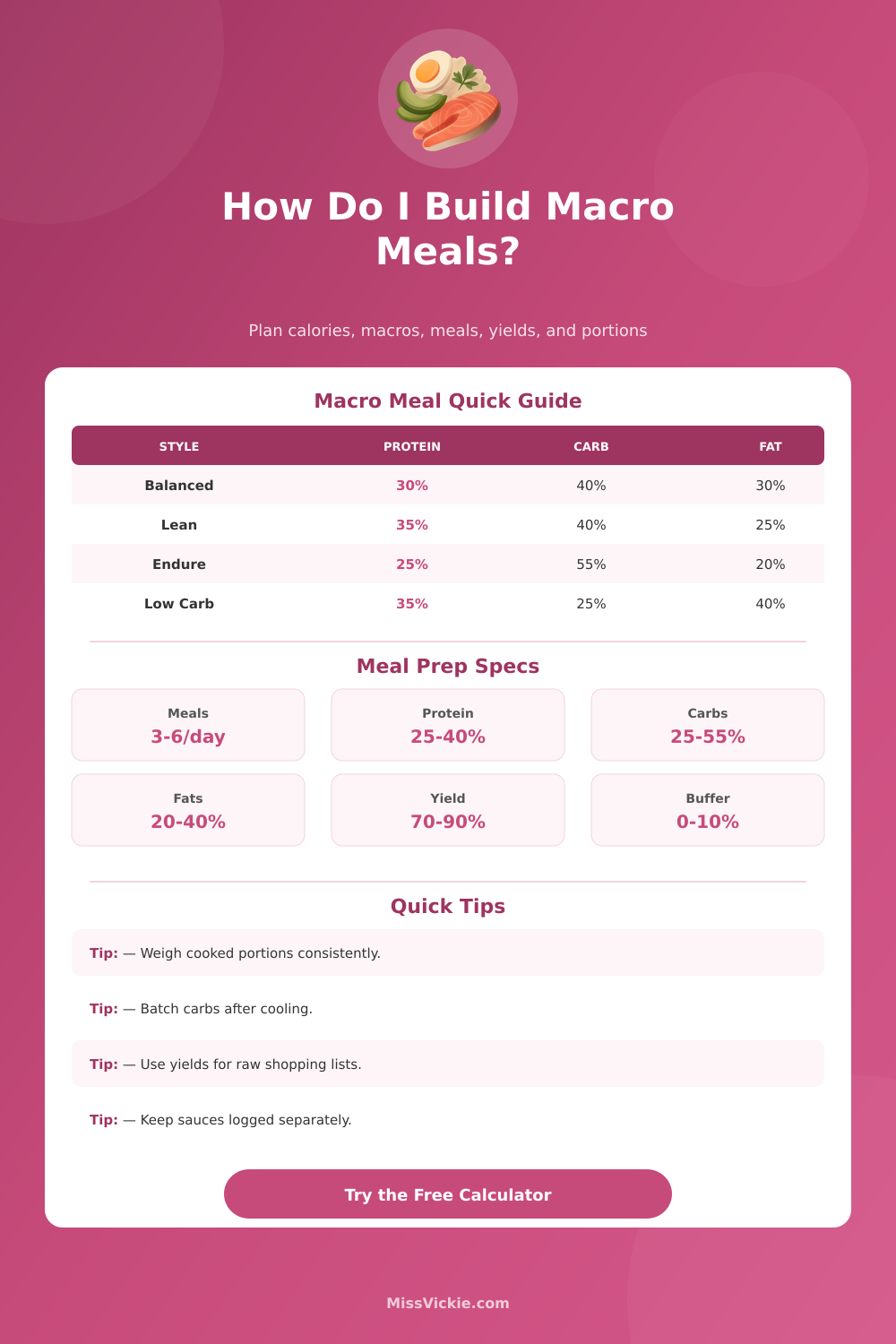
| Macro Style | Protein | Carbs | Fat | Best For |
|---|---|---|---|---|
| Balanced | 30% | 40% | 30% | General meal prep with steady portions |
| Lean | 35% | 40% | 25% | Higher protein meals with moderate carbs |
| High protein | 40% | 30% | 30% | Protein-forward plates and simple tracking |
| Endurance | 25% | 55% | 20% | Training days, long work shifts, or active weekends |
| Low carb | 35% | 25% | 40% | Lower-starch meals with a larger fat portion |
| Plant-forward | 25% | 50% | 25% | Beans, lentils, grains, tofu, and high-fiber bowls |
| Ingredient | Cooked Macro Basis | Typical Yield | Planning Note |
|---|---|---|---|
| Chicken breast | 31g protein per 100g cooked | 74% cooked from raw | Start with more raw weight because lean meat loses water. |
| Lean ground turkey | 29g protein per 100g cooked | 75% cooked from raw | Drain consistently if comparing batches. |
| White rice | 28g carbs per 100g cooked | 2.9x cooked from dry | Use cooked weight for containers, dry weight for shopping. |
| Pasta | 31g carbs per 100g cooked | 2.4x cooked from dry | Al dente pasta weighs less than softer pasta. |
| Potatoes | 20g carbs per 100g cooked | 92% cooked from raw | Roasting loses more water than boiling. |
| Olive oil | 100g fat per 100g | No cooking yield | Weigh after cooking if oil remains in the pan. |
Works well with chicken, rice, vegetables, and measured oil.
Uses a bigger protein scoop and a smaller fat add-on.
Shifts more calories into rice, pasta, potatoes, or oats.
Keeps starch portions smaller and uses avocado, nuts, or oil.
| Daily Target | 3 Meals | 4 Meals | 5 Meals | 6 Meals |
|---|---|---|---|---|
| 1600 calories | 533 calories each | 400 calories each | 320 calories each | 267 calories each |
| 2000 calories | 667 calories each | 500 calories each | 400 calories each | 333 calories each |
| 2400 calories | 800 calories each | 600 calories each | 480 calories each | 400 calories each |
| 2800 calories | 933 calories each | 700 calories each | 560 calories each | 467 calories each |
Meal planning require you to balance the calories and macronutrient in your meals. Meal planning can be difficult because you must account for the difference between raw food weight and cooked food weights. For example, if you plan on including chicken breast in your meals, the weight of the cooked chicken breast will be less than the raw chicken breast because the raw chicken lose moisture during the cooking process.
Additionally, rice increase in volume when it is cooked because the dry rice absorbs water. In this case, the cooked weight of the rice will be much higher than the dry weight of the rice. To account for these change in weights, you must use a calculator to determine the weights of the various food item that you plan to include in your meals.
Plan Meals with a Food Weight Calculator
The calculator make it easier to account for the changes in food weights because the calculator can perform the mathematical calculations for you. For example, you can enter your target calorie intake and the number of meals that you plan to prepare in the calculator. The calculator will show you the weights of the different food item that you need in order to reach your calorie target.
Suppose you select chicken breast instead of salmon for your meals. In this case, the protein content are different between the two types of meat. The calculator will change the weight of the chicken breast so that you can still reach your protein goal.
Suppose instead you choose white rice over sweet potato as the source of your carbohydrates. In this case, the volume of the carbohydrates will be different between the two foods. The calculator will change the weight of the rice so that you can still reach your carbohydrate target.
Thus, the calculator ensure that each meal that you prepare is consistent with your nutritional goals. The meal count can have an impact on the portion size of the food in your meals. For example, if you decide that you would like to eat four meals per day instead of three meals, then each meal will contain less food than if you ate three meals per day.
If you change the meal count in the meal planning calculator, the meal planning calculator will automatically recalculate the portion sizes for each meal for you. This is important so that you do not attempt to estimate the portion size of the food that you will cook. If you attempt to measure the portion sizes of the food by eye, you are likely to make error in the total number of calories and macronutrients that you cook.
You can use the ingredient style presets to change the macronutrient ratio in your meals. For example, training-day presets increase the amount of carbohydrate in the meals and decrease the amount of fat in the meals. Low-carb presets decrease the amount of carbohydrate in the meals and increase the amount of fat in the meals.
These are not rules that you must follow, but they do provide a starting point for your meal planning based off the level of physical activity that you perform in a day. Using these presets allow you to adjust the volumes of the food items in your meals to match your macronutrient needs. The reference table indicate the yields of different food items.
For example, the reference tables indicate that chicken breast cooks down to three-quarters of its raw weight. Knowing the weight of cooked chicken breast allow you to purchase the raw chicken breast at a weight that will provide the amount of cooked chicken breast that you would like to eat. The reference tables also provide information about how much the pasta expand when it is cooked.
Knowing this information allows you to weigh the amount of dry pasta that you will cook to provide your meals with the proper amount of carbohydrate. These table will assist you in cooking and shopping for food. Many meal planning mistake occur due to the use of different measurement system for food items.
For example, cooking chicken breast and weighing it may be one system for measuring food, but weighing dry rice may be a different system. If you use these two different systems for cooking and weighing food, the total amount of calories and macronutrients in your meals may be incorrect. The meal planning calculator will allow you to select your unit of measurement for food items.
Based on the unit of measurement that you select, the meal planning calculator will ensure that all food portion are consistent with that selection. Whether you use metric unit of measurement or imperial units, the meal planning calculator will calculate the correct amounts of food for you. Vegetables are an essential ingredient in most meals.
Nevertheless, you should plan for the amount of vegetable that you would like to include in each meal. Vegetables contain few calorie, but they do take up space in your meal container. If you do not plan for the weight of the vegetables that you will cook, you may reach the capacity of your meal containers before you have added the other ingredient to each meal.
By planning for the weight of the vegetables that you would like to include in each meal, you will be able to avoid filling up your meal containers to the point where the meals appear too full to eat. In addition to the calculation that the meal planning calculator will make for you, you should also use a buffer percentage to account for small error in the preparation of food. For example, you may eat some of the food while you are cooking it.
In addition, some of the food may stick to the pan when you are cooking it in a pan. Thus, if you cook meals for five days and use a five percent buffer, you will need to account for an extra portion of food for these small error when you are preparing your meals for cooking. Using a buffer ensure that each meal will be consistent in strength with your nutritional goals throughout the week.
If you use the meal planning calculator to calculate the starting weight of each food item for the entire meal prep window, you can easily determine the amount of raw food that you will need to purchase for the entire week of meal preparation.