Food weight, calories, water, fiber, fat, meal volume, servings, and satiety
Caloric Density Calculator
Estimate calorie density from food weight, calories, water content, fiber, fat, meal volume, preparation water change, and serving size.
Choose a common food or meal pattern, then adjust the weight, calories, water, fiber, fat, volume, and servings to match your plate.
Density Breakdown
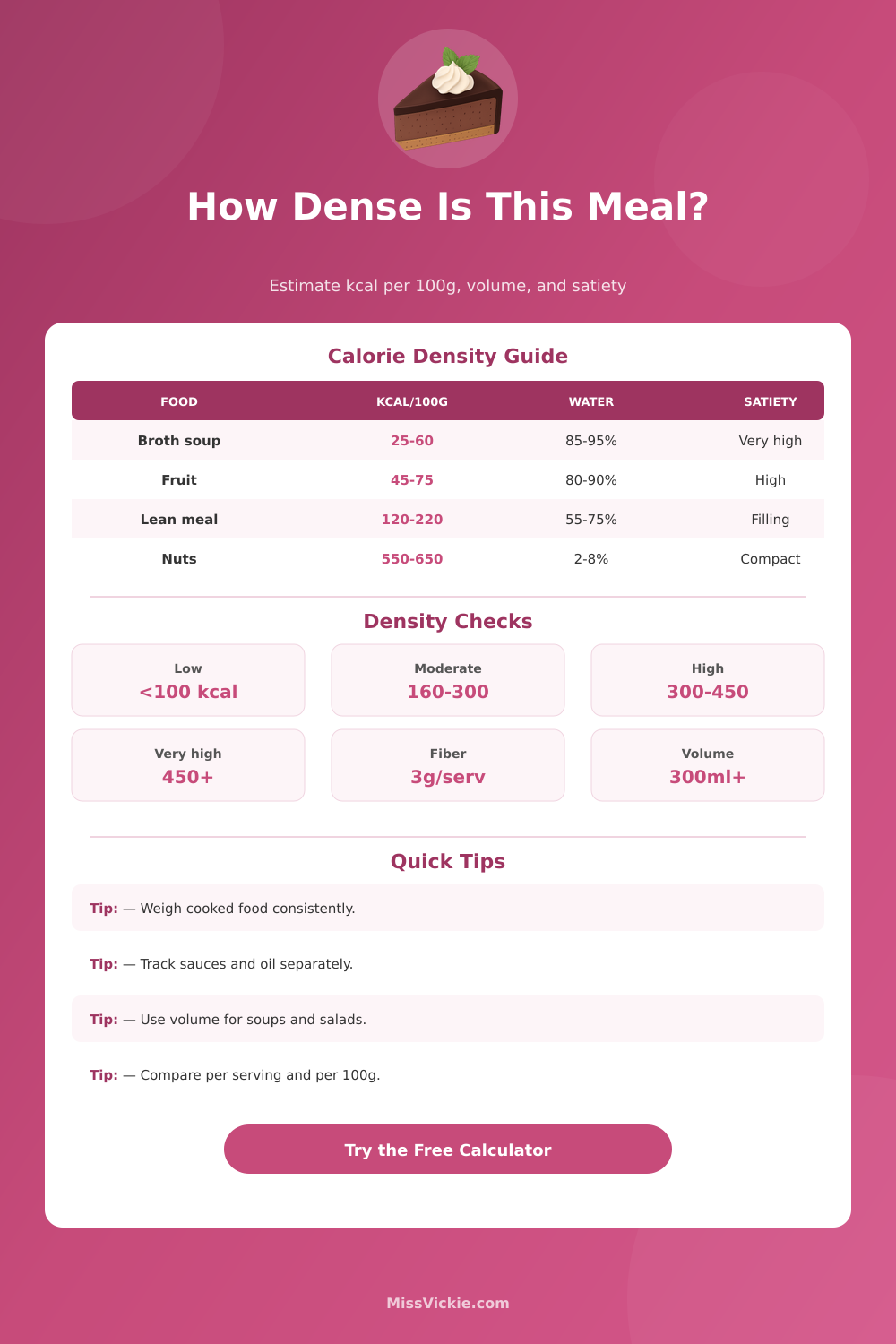
| Density Band | kcal per 100 g | Typical Foods | Planning Meaning |
|---|---|---|---|
| Very low density | Under 100 | Broth soups, leafy vegetables, berries, melon | Large portions can fit into a modest calorie target. |
| Low density | 100 to 160 | Oatmeal, potatoes, beans, lean yogurt, many stews | Usually filling when fiber, water, or protein is present. |
| Moderate density | 160 to 300 | Lean meat plates, rice bowls, pasta with vegetables | Portion size matters, but meals can still be substantial. |
| High density | 300 to 450 | Cheese-heavy dishes, fried foods, pastries, creamy sauces | Smaller servings deliver calories quickly. |
| Very high density | Over 450 | Nuts, oils, butter, chocolate, dense desserts | Best measured carefully because small amounts add up fast. |
| Driver | How It Affects Density | Calculator Treatment | Example Check |
|---|---|---|---|
| Water content | Adds weight and volume without calories | Raises water-weight and satiety points | Soup at 90% water usually scores more filling by volume. |
| Fiber grams | Adds bulk and slows the meal down | Adds satiety points per serving and per 100 g | Beans with 10 g fiber score higher than low-fiber rice. |
| Fat grams | Concentrates calories in less space | Calculates percent of calories from fat | Oil or nuts can move a meal into a higher density band. |
| Prep water change | Cooking can remove or add water weight | Recalculates density after the weight change | Roasted vegetables become denser after moisture loss. |
| Meal Volume | Approx Cups | Typical Example | Density Reading |
|---|---|---|---|
| 120 ml | About 1/2 cup | Nuts, granola, creamy dessert portion | Small volume can still carry many calories. |
| 240 ml | About 1 cup | Cooked rice, pasta, chopped fruit, yogurt | Compare cup calories with gram density. |
| 480 ml | About 2 cups | Large bowl, stew, oatmeal, meal salad | Often feels larger when water and fiber are high. |
| 720 ml | About 3 cups | Broth soup, big salad, vegetable-heavy bowl | High volume can lower calories per cup. |
| Serving Type | Common Weight | Useful For | Portion Note |
|---|---|---|---|
| Snack portion | 25 to 60 g | Nuts, cheese, crackers, dried fruit | Small servings can be dense, so weighing helps. |
| Side portion | 100 to 180 g | Rice, potatoes, cooked vegetables, fruit | Works well for comparing side dishes. |
| Main plate | 250 to 450 g | Protein plates, grain bowls, pasta meals | Use full served weight including sauces. |
| Soup or salad bowl | 350 to 700 g | Broth soup, meal salad, vegetable stew | Volume and water content strongly affect fullness. |
Very low density because water and volume are high.
Often filling per calorie when broth and vegetables dominate.
Water and fiber keep most whole fruit in a low band.
Fiber raises satiety even when calories are moderate.
Lower water than vegetables but usually filling per serving.
Density depends on water absorbed and added oil or sauce.
Sugar and fat push calories into a smaller serving.
Very compact calories, useful but easy to underestimate.
Caloric density are a measurement of the energy in a food relative to the weight of that food. Caloric density is important in that the caloric density of meals will impact how full individual feel after eating. Meals that have low caloric density will leave an individual feeling full after eating because low caloric density meals typically contains a high amount of water and fiber.
Meals that have high caloric density will leave an individual feeling hungry after eating because meals with high caloric density contains a high amount of energy but little weight. Many individuals does not measure the caloric density of the foods that they eat. However, individuals may feel the effects of caloric density if they have chosen foods that contain different amounts of water and energy.
What is caloric density and why it matters
Caloric density is dependent upon the amount of water, fiber, and air to energy that a food contain. Foods that contain a large amount of water (such as broths) will have low caloric density. Foods that contain very little water (such as nuts and cheese) will have high caloric density.
Because foods with high caloric density contain a high amount of energy relative to their weight, a small portion of high caloric density foods can contain the same amount of energy as a large portion of low caloric density foods. Individuals can use the calculator to determine the caloric density of foods. To use the calculator, individuals must enter the cooked weight of the food that they would like calculate the caloric density of, the total calories of the food, the percentage of water in the food, the amount of fiber in the food, and the amount of fat in the food.
The calculator will provide three different outputs: the number of calories per 100 gram of the food, the comparison between the volume of the food and the amount of calories of the food, and the satiety score of the food (how full the food will make an individual feel). These three different outputs can help individuals to understand whether they are consuming a large amount of food relative to the energy they are consuming. Water content is one of the factors that can impact caloric density.
Foods that contain a high amount of water will have low caloric density. The caloric density calculator incorporate the percentage of water in the food in the determination of the caloric density of the food. Thus, foods with high amounts of water (like salads) will have low caloric density scores relative to foods with low amount of water (like cooked ground beef).
Fiber content is another factor that can impact the caloric density and satiety score of foods. Foods that contain a high amount of fiber will tend to make an individual feel full after eating because fiber slow the digestion of food. Thus, the caloric density calculator incorporates the fiber content of the food into the calculation of its satiety score.
Finally, fat has an effect upon caloric density; fat contains more than twice the calories of protein or carbohydrate of the same weight. Thus, the caloric density calculator also calculates the fat content of foods to allow individuals to understand how fat can increase the caloric density of meals that contain fats like oil or cheese. The preparation of foods can also have an impact upon the caloric density of the food.
For instance, roasting vegetables can remove some of the water from the vegetables. Thus, the caloric density of vegetables can increase after roasting. Additionally, cooking foods like rice or oats increases the amount of water in those foods.
Thus, adding water to foods increases their caloric density. These factors can be accounted for in the calculator. Many meals are more complex than the food categories that is represented in the caloric density calculator.
Burrito bowls, for example, contain many different foods. The caloric density calculator allows individuals to override the preset values for foods to account for actual meals. Thus, individuals can use the calculator to calculate the caloric density of a more complex meal by entering the values of each food that is contained in that meal.
One of the most common errors in using the caloric density calculator is weighing raw foods and comparing their weight to cooked foods. For instance, dry rice will absorb water when cooked and increase in weight. Thus, if an individual inputs the weight of dry rice into the calculator, the caloric density number will be too high.
Additionally, if an individual weighs roasted foods, such as meat, that meat will have lost some of its original weight due to the roasting process. Thus, to avoid these issues, individuals must always weigh their foods in the same state; all raw or all cooked. Another common error is to omit sauces and dressings from the calculations.
These condiments contain calories and fat that increase the caloric density of the meal. Thus, individuals are required to enter the total amount of fat and calories of the entire meal. Additionally, individuals must account for any added ingredient with calories, such as nuts, cheese or dressings.
Volume is another factor in caloric density that individuals may not think of when using the calculator. While a meal may weigh a lot, it may contain a lot of liquid. Conversely, a sandwich may weigh very little but contain a lot of solid food.
Thus, the volume field in the calculator will allow individuals to input the volume of the food that they are calculating to determine its caloric density. High volume foods will make individuals feel full after eating. Low volume foods will not fill individuals as quickly as high volume foods.
Satiety is a result of caloric density, fiber, water, fat and the time of eating meals. Foods with high satiety scores usually contain a sufficient amount of water, fiber and volume to keep individuals from eating more food after eating the food. Foods with high caloric density, despite being able to fill an individual of the necessary calories, may leave the stomach feeling empty and an individual feeling hungry after eating.
These numbers provide individuals with the ability to make better choices about the types of food that they eat throughout the day. For instance, if an individual’s lunch has high caloric density yet does not leave them feeling full, they may not need to eat foods with fewer calories; they may need to increase the volume of the food that they eat. The habit of calculating the caloric density of meals can help individuals to change the way in which they shop for foods and plate meals.
For instance, individuals may desire to select foods that contain more water and fiber to increase the volume of foods that they eat without increasing the caloric intake of those foods. Additionally, individuals may become more aware of how the preparation of food can alter its caloric density. Thus, individuals may begin to select cooking methods for their foods.
While caloric density numbers will not provide the same satisfaction as eating food, the numbers allow individuals to avoid eating foods that they may have otherwise selected due to lack of knowledge about the caloric density of those foods. Finally, the logic behind caloric density can be used both for weight management as well as for performance-based reasons. Because caloric density is a measurement of the relationship between the weight of foods and the amount of energy they contain, individuals can use the caloric density calculator as a reference point.
When an individual has meals that they are not sure about, they can use the caloric density calculator as a way to determine whether the meal is sufficient for their needs. Thus, using this calculator regularly will allow individuals to understand how much food is actually enough food for themselves. Caloric density are a measurement of the energy in a food relative to the weight of that food.
Caloric density is important in that the caloric density of meals will impact how full individual feel after eating. Meals that have low caloric density will leave an individual feeling full after eating because low caloric density meals typically contains a high amount of water and fiber. Meals that have high caloric density will leave an individual feeling hungry after eating because meals with high caloric density contains a high amount of energy but little weight.
Many individuals does not measure the caloric density of the foods that they eat. However, individuals may feel the effects of caloric density if they have chosen foods that contain different amounts of water and energy. Caloric density is dependent upon the amount of water, fiber, and air to energy that a food contain.
Foods that contain a large amount of water (such as broths) will have low caloric density. Foods that contain very little water (such as nuts and cheese) will have high caloric density. Because foods with high caloric density contain a high amount of energy relative to their weight, a small portion of high caloric density foods can contain the same amount of energy as a large portion of low caloric density foods.
Individuals can use the calculator to determine the caloric density of foods. To use the calculator, individuals must enter the cooked weight of the food that they would like calculate the caloric density of, the total calories of the food, the percentage of water in the food, the amount of fiber in the food, and the amount of fat in the food. The calculator will provide three different outputs: the number of calories per 100 gram of the food, the comparison between the volume of the food and the amount of calories of the food, and the satiety score of the food (how full the food will make an individual feel).
These three different outputs can help individuals to understand whether they are consuming a large amount of food relative to the energy they are consuming. Water content is one of the factors that can impact caloric density. Foods that contain a high amount of water will have low caloric density.
The caloric density calculator incorporate the percentage of water in the food in the determination of the caloric density of the food. Thus, foods with high amounts of water (like salads) will have low caloric density scores relative to foods with low amount of water (like cooked ground beef). Fiber content is another factor that can impact the caloric density and satiety score of foods.
Foods that contain a high amount of fiber will tend to make an individual feel full after eating because fiber slow the digestion of food. Thus, the caloric density calculator incorporates the fiber content of the food into the calculation of its satiety score. Finally, fat has an effect upon caloric density; fat contains more than twice the calories of protein or carbohydrate of the same weight.
Thus, the caloric density calculator also calculates the fat content of foods to allow individuals to understand how fat can increase the caloric density of meals that contain fats like oil or cheese. The preparation of foods can also have an impact upon the caloric density of the food. For instance, roasting vegetables can remove some of the water from the vegetables.
Thus, the caloric density of vegetables can increase after roasting. Additionally, cooking foods like rice or oats increases the amount of water in those foods. Thus, adding water to foods increases their caloric density.
These factors can be accounted for in the calculator. Many meals are more complex than the food categories that is represented in the caloric density calculator. Burrito bowls, for example, contain many different foods.
The caloric density calculator allows individuals to override the preset values for foods to account for actual meals. Thus, individuals can use the calculator to calculate the caloric density of a more complex meal by entering the values of each food that is contained in that meal. One of the most common errors in using the caloric density calculator is weighing raw foods and comparing their weight to cooked foods.
For instance, dry rice will absorb water when cooked and increase in weight. Thus, if an individual inputs the weight of dry rice into the calculator, the caloric density number will be too high. Additionally, if an individual weighs roasted foods, such as meat, that meat will have lost some of its original weight due to the roasting process.
Thus, to avoid these issues, individuals must always weigh their foods in the same state; all raw or all cooked. Another common error is to omit sauces and dressings from the calculations. These condiments contain calories and fat that increase the caloric density of the meal.
Thus, individuals are required to enter the total amount of fat and calories of the entire meal. Additionally, individuals must account for any added ingredient with calories, such as nuts, cheese or dressings. Volume is another factor in caloric density that individuals may not think of when using the calculator.
While a meal may weigh a lot, it may contain a lot of liquid. Conversely, a sandwich may weigh very little but contain a lot of solid food. Thus, the volume field in the calculator will allow individuals to input the volume of the food that they are calculating to determine its caloric density.
High volume foods will make individuals feel full after eating. Low volume foods will not fill individuals as quickly as high volume foods. Satiety is a result of caloric density, fiber, water, fat and the time of eating meals.
Foods with high satiety scores usually contain a sufficient amount of water, fiber and volume to keep individuals from eating more food after eating the food. Foods with high caloric density, despite being able to fill an individual of the necessary calories, may leave the stomach feeling empty and an individual feeling hungry after eating. These numbers provide individuals with the ability to make better choices about the types of food that they eat throughout the day.
For instance, if an individual’s lunch has high caloric density yet does not leave them feeling full, they may not need to eat foods with fewer calories; they may need to increase the volume of the food that they eat. The habit of calculating the caloric density of meals can help individuals to change the way in which they shop for foods and plate meals. For instance, individuals may desire to select foods that contain more water and fiber to increase the volume of foods that they eat without increasing the caloric intake of those foods.
Additionally, individuals may become more aware of how the preparation of food can alter its caloric density. Thus, individuals may begin to select cooking methods for their foods. While caloric density numbers will not provide the same satisfaction as eating food, the numbers allow individuals to avoid eating foods that they may have otherwise selected due to lack of knowledge about the caloric density of those foods.
Finally, the logic behind caloric density can be used both for weight management as well as for performance-based reasons. Because caloric density is a measurement of the relationship between the weight of foods and the amount of energy they contain, individuals can use the caloric density calculator as a reference point. When an individual has meals that they are not sure about, they can use the caloric density calculator as a way to determine whether the meal is sufficient for their needs.
Thus, using this calculator regularly will allow individuals to understand how much food is actually enough food for themselves. Caloric density are a measurement of the energy in a food relative to the weight of that food. Caloric density is important in that the caloric density of meals will impact how full individual feel after eating.
Meals that have low caloric density will leave an individual feeling full after eating because low caloric density meals typically contains a high amount of water and fiber. Meals that have high caloric density will leave an individual feeling hungry after eating because meals with high caloric density contains a high amount of energy but little weight. Many individuals does not measure the caloric density of the foods that they eat.
However, individuals may feel the effects of caloric density if they have chosen foods that contain different amounts of water and energy. Caloric density is dependent upon the amount of water, fiber, and air to energy that a food contain. Foods that contain a large amount of water (such as broths) will have low caloric density.
Foods that contain very little water (such as nuts and cheese) will have high caloric density. Because foods with high caloric density contain a high amount of energy relative to their weight, a small portion of high caloric density foods can contain the same amount of energy as a large portion of low caloric density foods. Individuals can use the calculator to determine the caloric density of foods.
To use the calculator, individuals must enter the cooked weight of the food that they would like calculate the caloric density of, the total calories of the food, the percentage of water in the food, the amount of fiber in the food, and the amount of fat in the food. The calculator will provide three different outputs: the number of calories per 100 gram of the food, the comparison between the volume of the food and the amount of calories of the food, and the satiety score of the food (how full the food will make an individual feel). These three different outputs can help individuals to understand whether they are consuming a large amount of food relative to the energy they are consuming.
Water content is one of the factors that can impact caloric density. Foods that contain a high amount of water will have low caloric density. The caloric density calculator incorporate the percentage of water in the food in the determination of the caloric density of the food.
Thus, foods with high amounts of water (like salads) will have low caloric density scores relative to foods with low amount of water (like cooked ground beef). Fiber content is another factor that can impact the caloric density and satiety score of foods. Foods that contain a high amount of fiber will tend to make an individual feel full after eating because fiber slow the digestion of food.
Thus, the caloric density calculator incorporates the fiber content of the food into the calculation of its satiety score. Finally, fat has an effect upon caloric density; fat contains more than twice the calories of protein or carbohydrate of the same weight. Thus, the caloric density calculator also calculates the fat content of foods to allow individuals to understand how fat can increase the caloric density of meals that contain fats like oil or cheese.
The preparation of foods can also have an impact upon the caloric density of the food. For instance, roasting vegetables can remove some of the water from the vegetables. Thus, the caloric density of vegetables can increase after roasting.
Additionally, cooking foods like rice or oats increases the amount of water in those foods. Thus, adding water to foods increases their caloric density. These factors can be accounted for in the calculator.
Many meals are more complex than the food categories that is represented in the caloric density calculator. Burrito bowls, for example, contain many different foods. The caloric density calculator allows individuals to override the preset values for foods to account for actual meals.
Thus, individuals can use the calculator to calculate the caloric density of a more complex meal by entering the values of each food that is contained in that meal. One of the most common errors in using the caloric density calculator is weighing raw foods and comparing their weight to cooked foods. For instance, dry rice will absorb water when cooked and increase in weight.
Thus, if an individual inputs the weight of dry rice into the calculator, the caloric density number will be too high. Additionally, if an individual weighs roasted foods, such as meat, that meat will have lost some of its original weight due to the roasting process. Thus, to avoid these issues, individuals must always weigh their foods in the same state; all raw or all cooked.
Another common error is to omit sauces and dressings from the calculations. These condiments contain calories and fat that increase the caloric density of the meal. Thus, individuals are required to enter the total amount of fat and calories of the entire meal.
Additionally, individuals must account for any added ingredient with calories, such as nuts, cheese or dressings. Volume is another factor in caloric density that individuals may not think of when using the calculator. While a meal may weigh a lot, it may contain a lot of liquid.
Conversely, a sandwich may weigh very little but contain a lot of solid food. Thus, the volume field in the calculator will allow individuals to input the volume of the food that they are calculating to determine its caloric density. High volume foods will make individuals feel full after eating.
Low volume foods will not fill individuals as quickly as high volume foods. Satiety is a result of caloric density, fiber, water, fat and the time of eating meals. Foods with high satiety scores usually contain a sufficient amount of water, fiber and volume to keep individuals from eating more food after eating the food.
Foods with high caloric density, despite being able to fill an individual of the necessary calories, may leave the stomach feeling empty and an individual feeling hungry after eating. These numbers provide individuals with the ability to make better choices about the types of food that they eat throughout the day. For instance, if an individual’s lunch has high caloric density yet does not leave them feeling full, they may not need to eat foods with fewer calories; they may need to increase the volume of the food that they eat.
The habit of calculating the caloric density of meals can help individuals to change the way in which they shop for foods and plate meals. For instance, individuals may desire to select foods that contain more water and fiber to increase the volume of foods that they eat without increasing the caloric intake of those foods. Additionally, individuals may become more aware of how the preparation of food can alter its caloric density.
Thus, individuals may begin to select cooking methods for their foods. While caloric density numbers will not provide the same satisfaction as eating food, the numbers allow individuals to avoid eating foods that they may have otherwise selected due to lack of knowledge about the caloric density of those foods. Finally, the logic behind caloric density can be used both for weight management as well as for performance-based reasons.
Because caloric density is a measurement of the relationship between the weight of foods and the amount of energy they contain, individuals can use the caloric density calculator as a reference point. When an individual has meals that they are not sure about, they can use the caloric density calculator as a way to determine whether the meal is sufficient for their needs. Thus, using this calculator regularly will allow individuals to understand how much food is actually enough food for themselves.
Caloric density are a measurement of the energy in a food relative to the weight of that food. Caloric density is important in that the caloric density of meals will impact how full individual feel after eating. Meals that have low caloric density will leave an individual feeling full after eating because low caloric density meals typically contains a high amount of water and fiber.
Meals that have high caloric density will leave an individual feeling hungry after eating because meals with high caloric density contains a high amount of energy but little weight. Many individuals does not measure the caloric density of the foods that they eat. However, individuals may feel the effects of caloric density if they have chosen foods that contain different amounts of water and energy.
Caloric density is dependent upon the amount of water, fiber, and air to energy that a food contain. Foods that contain a large amount of water (such as broths) will have low caloric density. Foods that contain very little water (such as nuts and cheese) will have high caloric density.
Because foods with high caloric density contain a high amount of energy relative to their weight, a small portion of high caloric density foods can contain the same amount of energy as a large portion of low caloric density foods. Individuals can use the calculator to determine the caloric density of foods. To use the calculator, individuals must enter the cooked weight of the food that they would like calculate the caloric density of, the total calories of the food, the percentage of water in the food, the amount of fiber in the food, and the amount of fat in the food.
The calculator will provide three different outputs: the number of calories per 100 gram of the food, the comparison between the volume of the food and the amount of calories of the food, and the satiety score of the food (how full the food will make an individual feel). These three different outputs can help individuals to understand whether they are consuming a large amount of food relative to the energy they are consuming. Water content is one of the factors that can impact caloric density.
Foods that contain a high amount of water will have low caloric density. The caloric density calculator incorporate the percentage of water in the food in the determination of the caloric density of the food. Thus, foods with high amounts of water (like salads) will have low caloric density scores relative to foods with low amount of water (like cooked ground beef).
Fiber content is another factor that can impact the caloric density and satiety score of foods. Foods that contain a high amount of fiber will tend to make an individual feel full after eating because fiber slow the digestion of food. Thus, the caloric density calculator incorporates the fiber content of the food into the calculation of its satiety score.
Finally, fat has an effect upon caloric density; fat contains more than twice the calories of protein or carbohydrate of the same weight. Thus, the caloric density calculator also calculates the fat content of foods to allow individuals to understand how fat can increase the caloric density of meals that contain fats like oil or cheese. The preparation of foods can also have an impact upon the caloric density of the food.
For instance, roasting vegetables can remove some of the water from the vegetables. Thus, the caloric density of vegetables can increase after roasting. Additionally, cooking foods like rice or oats increases the amount of water in those foods.
Thus, adding water to foods increases their caloric density. These factors can be accounted for in the calculator. Many meals are more complex than the food categories that is represented in the caloric density calculator.
Burrito bowls, for example, contain many different foods. The caloric density calculator allows individuals to override the preset values for foods to account for actual meals. Thus, individuals can use the calculator to calculate the caloric density of a more complex meal by entering the values of each food that is contained in that meal.
One of the most common errors in using the caloric density calculator is weighing raw foods and comparing their weight to cooked foods. For instance, dry rice will absorb water when cooked and increase in weight. Thus, if an individual inputs the weight of dry rice into the calculator, the caloric density number will be too high.
Additionally, if an individual weighs roasted foods, such as meat, that meat will have lost some of its original weight due to the roasting process. Thus, to avoid these issues, individuals must always weigh their foods in the same state; all raw or all cooked. Another common error is to omit sauces and dressings from the calculations.
These condiments contain calories and fat that increase the caloric density of the meal. Thus, individuals are required to enter the total amount of fat and calories of the entire meal. Additionally, individuals must account for any added ingredient with calories, such as nuts, cheese or dressings.
Volume is another factor in caloric density that individuals may not think of when using the calculator. While a meal may weigh a lot, it may contain a lot of liquid. Conversely, a sandwich may weigh very little but contain a lot of solid food.
Thus, the volume field in the calculator will allow individuals to input the volume of the food that they are calculating to determine its caloric density. High volume foods will make individuals feel full after eating. Low volume foods will not fill individuals as quickly as high volume foods.
Satiety is a result of caloric density, fiber, water, fat and the time of eating meals. Foods with high satiety scores usually contain a sufficient amount of water, fiber and volume to keep individuals from eating more food after eating the food. Foods with high caloric density, despite being able to fill an individual of the necessary calories, may leave the stomach feeling empty and an individual feeling hungry after eating.
These numbers provide individuals with the ability to make better choices about the types of food that they eat throughout the day. For instance, if an individual’s lunch has high caloric density yet does not leave them feeling full, they may not need to eat foods with fewer calories; they may need to increase the volume of the food that they eat. The habit of calculating the caloric density of meals can help individuals to change the way in which they shop for foods and plate meals.
For instance, individuals may desire to select foods that contain more water and fiber to increase the volume of foods that they eat without increasing the caloric intake of those foods. Additionally, individuals may become more aware of how the preparation of food can alter its caloric density. Thus, individuals may begin to select cooking methods for their foods.
While caloric density numbers will not provide the same satisfaction as eating food, the numbers allow individuals to avoid eating foods that they may have otherwise selected due to lack of knowledge about the caloric density of those foods. Finally, the logic behind caloric density can be used both for weight management as well as for performance-based reasons. Because caloric density is a measurement of the relationship between the weight of foods and the amount of energy they contain, individuals can use the caloric density calculator as a reference point.
When an individual has meals that they are not sure about, they can use the caloric density calculator as a way to determine whether the meal is sufficient for their needs. Thus, using this calculator regularly will allow individuals to understand how much food is actually enough food for themselves. Caloric density are a measurement of the energy in a food relative to the weight of that food.
Caloric density is important in that the caloric density of meals will impact how full individual feel after eating. Meals that have low caloric density will leave an individual feeling full after eating because low caloric density meals typically contains a high amount of water and fiber. Meals that have high caloric density will leave an individual feeling hungry after eating because meals with high caloric density contains a high amount of energy but little weight.
Many individuals does not measure the caloric density of the foods that they eat. However, individuals may feel the effects of caloric density if they have chosen foods that contain different amounts of water and energy. Caloric density is dependent upon the amount of water, fiber, and air to energy that a food contain.
Foods that contain a large amount of water (such as broths) will have low caloric density. Foods that contain very little water (such as nuts and cheese) will have high caloric density. Because foods with high caloric density contain a high amount of energy relative to their weight, a small portion of high caloric density foods can contain the same amount of energy as a large portion of low caloric density foods.
Individuals can use the calculator to determine the caloric density of foods. To use the calculator, individuals must enter the cooked weight of the food that they would like calculate the caloric density of, the total calories of the food, the percentage of water in the food, the amount of fiber in the food, and the amount of fat in the food. The calculator will provide three different outputs: the number of calories per 100 gram of the food, the comparison between the volume of the food and the amount of calories of the food, and the satiety score of the food (how full the food will make an individual feel).
These three different outputs can help individuals to understand whether they are consuming a large amount of food relative to the energy they are consuming. Water content is one of the factors that can impact caloric density. Foods that contain a high amount of water will have low caloric density.
The caloric density calculator incorporate the percentage of water in the food in the determination of the caloric density of the food. Thus, foods with high amounts of water (like salads) will have low caloric density scores relative to foods with low amount of water (like cooked ground beef). Fiber content is another factor that can impact the caloric density and satiety score of foods.
Foods that contain a high amount of fiber will tend to make an individual feel full after eating because fiber slow the digestion of food. Thus, the caloric density calculator incorporates the fiber content of the food into the calculation of its satiety score. Finally, fat has an effect upon caloric density; fat contains more than twice the calories of protein or carbohydrate of the same weight.
Thus, the caloric density calculator also calculates the fat content of foods to allow individuals to understand how fat can increase the caloric density of meals that contain fats like oil or cheese. The preparation of foods can also have an impact upon the caloric density of the food. For instance, roasting vegetables can remove some of the water from the vegetables.
Thus, the caloric density of vegetables can increase after roasting. Additionally, cooking foods like rice or oats increases the amount of water in those foods. Thus, adding water to foods increases their caloric density.
These factors can be accounted for in the calculator. Many meals are more complex than the food categories that is represented in the caloric density calculator. Burrito bowls, for example, contain many different foods.
The caloric density calculator allows individuals to override the preset values for foods to account for actual meals. Thus, individuals can use the calculator to calculate the caloric density of a more complex meal by entering the values of each food that is contained in that meal. One of the most common errors in using the caloric density calculator is weighing raw foods and comparing their weight to cooked foods.
For instance, dry rice will absorb water when cooked and increase in weight. Thus, if an individual inputs the weight of dry rice into the calculator, the caloric density number will be too high. Additionally, if an individual weighs roasted foods, such as meat, that meat will have lost some of its original weight due to the roasting process.
Thus, to avoid these issues, individuals must always weigh their foods in the same state; all raw or all cooked. Another common error is to omit sauces and dressings from the calculations. These condiments contain calories and fat that increase the caloric density of the meal.
Thus, individuals are required to enter the total amount of fat and calories of the entire meal. Additionally, individuals must account for any added ingredient with calories, such as nuts, cheese or dressings. Volume is another factor in caloric density that individuals may not think of when using the calculator.
While a meal may weigh a lot, it may contain a lot of liquid. Conversely, a sandwich may weigh very little but contain a lot of solid food. Thus, the volume field in the calculator will allow individuals to input the volume of the food that they are calculating to determine its caloric density.
High volume foods will make individuals feel full after eating. Low volume foods will not fill individuals as quickly as high volume foods. Satiety is a result of caloric density, fiber, water, fat and the time of eating meals.
Foods with high satiety scores usually contain a sufficient amount of water, fiber and volume to keep individuals from eating more food after eating the food. Foods with high caloric density, despite being able to fill an individual of the necessary calories, may leave the stomach feeling empty and an individual feeling hungry after eating. These numbers provide individuals with the ability to make better choices about the types of food that they eat throughout the day.
For instance, if an individual’s lunch has high caloric density yet does not leave them feeling full, they may not need to eat foods with fewer calories; they may need to increase the volume of the food that they eat. The habit of calculating the caloric density of meals can help individuals to change the way in which they shop for foods and plate meals. For instance, individuals may desire to select foods that contain more water and fiber to increase the volume of foods that they eat without increasing the caloric intake of those foods.
Additionally, individuals may become more aware of how the preparation of food can alter its caloric density. Thus, individuals may begin to select cooking methods for their foods. While caloric density numbers will not provide the same satisfaction as eating food, the numbers allow individuals to avoid eating foods that they may have otherwise selected due to lack of knowledge about the caloric density of those foods.
Finally, the logic behind caloric density can be used both for weight management as well as for performance-based reasons. Because caloric density is a measurement of the relationship between the weight of foods and the amount of energy they contain, individuals can use the caloric density calculator as a reference point. When an individual has meals that they are not sure about, they can use the caloric density calculator as a way to determine whether the meal is sufficient for their needs.
Thus, using this calculator regularly will allow individuals to understand how much food is actually enough food for themselves. Caloric density are a measurement of the energy in a food relative to the weight of that food. Caloric density is important in that the caloric density of meals will impact how full individual feel after eating.
Meals that have low caloric density will leave an individual feeling full after eating because low caloric density meals typically contains a high amount of water and fiber. Meals that have high caloric density will leave an individual feeling hungry after eating because meals with high caloric density contains a high amount of energy but little weight. Many individuals does not measure the caloric density of the foods that they eat.
However, individuals may feel the effects of caloric density if they have chosen foods that contain different amounts of water and energy. Caloric density is dependent upon the amount of water, fiber, and air to energy that a food contain. Foods that contain a large amount of water (such as broths) will have low caloric density.
Foods that contain very little water (such as nuts and cheese) will have high caloric density. Because foods with high caloric density contain a high amount of energy relative to their weight, a small portion of high caloric density foods can contain the same amount of energy as a large portion of low caloric density foods. Individuals can use the calculator to determine the caloric density of foods.
To use the calculator, individuals must enter the cooked weight of the food that they would like calculate the caloric density of, the total calories of the food, the percentage of water in the food, the amount of fiber in the food, and the amount of fat in the food. The calculator will provide three different outputs: the number of calories per 100 gram of the food, the comparison between the volume of the food and the amount of calories of the food, and the satiety score of the food (how full the food will make an individual feel). These three different outputs can help individuals to understand whether they are consuming a large amount of food relative to the energy they are consuming.
Water content is one of the factors that can impact caloric density. Foods that contain a high amount of water will have low caloric density. The caloric density calculator incorporate the percentage of water in the food in the determination of the caloric density of the food.
Thus, foods with high amounts of water (like salads) will have low caloric density scores relative to foods with low amount of water (like cooked ground beef). Fiber content is another factor that can impact the caloric density and satiety score of foods. Foods that contain a high amount of fiber will tend to make an individual feel full after eating because fiber slow the digestion of food.
Thus, the caloric density calculator incorporates the fiber content of the food into the calculation of its satiety score. Finally, fat has an effect upon caloric density; fat contains more than twice the calories of protein or carbohydrate of the same weight. Thus, the caloric density calculator also calculates the fat content of foods to allow individuals to understand how fat can increase the caloric density of meals that contain fats like oil or cheese.
The preparation of foods can also have an impact upon the caloric density of the food. For instance, roasting vegetables can remove some of the water from the vegetables. Thus, the caloric density of vegetables can increase after roasting.
Additionally, cooking foods like rice or oats increases the amount of water in those foods. Thus, adding water to foods increases their caloric density. These factors can be accounted for in the calculator.
Many meals are more complex than the food categories that is represented in the caloric density calculator. Burrito bowls, for example, contain many different foods. The caloric density calculator allows individuals to override the preset values for foods to account for actual meals.
Thus, individuals can use the calculator to calculate the caloric density of a more complex meal by entering the values of each food that is contained in that meal. One of the most common errors in using the caloric density calculator is weighing raw foods and comparing their weight to cooked foods. For instance, dry rice will absorb water when cooked and increase in weight.
Thus, if an individual inputs the weight of dry rice into the calculator, the caloric density number will be too high. Additionally, if an individual weighs roasted foods, such as meat, that meat will have lost some of its original weight due to the roasting process. Thus, to avoid these issues, individuals must always weigh their foods in the same state; all raw or all cooked.
Another common error is to omit sauces and dressings from the calculations. These condiments contain calories and fat that increase the caloric density of the meal. Thus, individuals are required to enter the total amount of fat and calories of the entire meal.
Additionally, individuals must account for any added ingredient with calories, such as nuts, cheese or dressings. Volume is another factor in caloric density that individuals may not think of when using the calculator. While a meal may weigh a lot, it may contain a lot of liquid.
Conversely, a sandwich may weigh very little but contain a lot of solid food. Thus, the volume field in the calculator will allow individuals to input the volume of the food that they are calculating to determine its caloric density. High volume foods will make individuals feel full after eating.
Low volume foods will not fill individuals as quickly as high volume foods. Satiety is a result of caloric density, fiber, water, fat and the time of eating meals. Foods with high satiety scores usually contain a sufficient amount of water, fiber and volume to keep individuals from eating more food after eating the food.
Foods with high caloric density, despite being able to fill an individual of the necessary calories, may leave the stomach feeling empty and an individual feeling hungry after eating. These numbers provide individuals with the ability to make better choices about the types of food that they eat throughout the day. For instance, if an individual’s lunch has high caloric density yet does not leave them feeling full, they may not need to eat foods with fewer calories; they may need to increase the volume of the food that they eat.
The habit of calculating the caloric density of meals can help individuals to change the way in which they shop for foods and plate meals. For instance, individuals may desire to select foods that contain more water and fiber to increase the volume of foods that they eat without increasing the caloric intake of those foods. Additionally, individuals may become more aware of how the preparation of food can alter its caloric density.
Thus, individuals may begin to select cooking methods for their foods. While caloric density numbers will not provide the same satisfaction as eating food, the numbers allow individuals to avoid eating foods that they may have otherwise selected due to lack of knowledge about the caloric density of those foods. Finally, the logic behind caloric density can be used both for weight management as well as for performance-based reasons.
Because caloric density is a measurement of the relationship between the weight of foods and the amount of energy they contain, individuals can use the caloric density calculator as a reference point. When an individual has meals that they are not sure about, they can use the caloric density calculator as a way to determine whether the meal is sufficient for their needs. Thus, using this calculator regularly will allow individuals to understand how much food is actually enough food for themselves.
Caloric density are a measurement of the energy in a food relative to the weight of that food. Caloric density is important in that the caloric density of meals will impact how full individual feel after eating. Meals that have low caloric density will leave an individual feeling full after eating because low caloric density meals typically contains a high amount of water and fiber.
Meals that have high caloric density will leave an individual feeling hungry after eating because meals with high caloric density contains a high amount of energy but little weight. Many individuals does not measure the caloric density of the foods that they eat. However, individuals may feel the effects of caloric density if they have chosen foods that contain different amounts of water and energy.
Caloric density is dependent upon the amount of water, fiber, and air to energy that a food contain. Foods that contain a large amount of water (such as broths) will have low caloric density. Foods that contain very little water (such as nuts and cheese) will have high caloric density.
Because foods with high caloric density contain a high amount of energy relative to their weight, a small portion of high caloric density foods can contain the same amount of energy as a large portion of low caloric density foods. Individuals can use the calculator to determine the caloric density of foods. To use the calculator, individuals must enter the cooked weight of the food that they would like calculate the caloric density of, the total calories of the food, the percentage of water in the food, the amount of fiber in the food, and the amount of fat in the food.
The calculator will provide three different outputs: the number of calories per 100 gram of the food, the comparison between the volume of the food and the amount of calories of the food, and the satiety score of the food (how full the food will make an individual feel). These three different outputs can help individuals to understand whether they are consuming a large amount of food relative to the energy they are consuming. Water content is one of the factors that can impact caloric density.
Foods that contain a high amount of water will have low caloric density. The caloric density calculator incorporate the percentage of water in the food in the determination of the caloric density of the food. Thus, foods with high amounts of water (like salads) will have low caloric density scores relative to foods with low amount of water (like cooked ground beef).
Fiber content is another factor that can impact the caloric density and satiety score of foods. Foods that contain a high amount of fiber will tend to make an individual feel full after eating because fiber slow the digestion of food. Thus, the caloric density calculator incorporates the fiber content of the food into the calculation of its satiety score.
Finally, fat has an effect upon caloric density; fat contains more than twice the calories of protein or carbohydrate of the same weight. Thus, the caloric density calculator also calculates the fat content of foods to allow individuals to understand how fat can increase the caloric density of meals that contain fats like oil or cheese. The preparation of foods can also have an impact upon the caloric density of the food.
For instance, roasting vegetables can remove some of the water from the vegetables. Thus, the caloric density of vegetables can increase after roasting. Additionally, cooking foods like rice or oats increases the amount of water in those foods.
Thus, adding water to foods increases their caloric density. These factors can be accounted for in the calculator. Many meals are more complex than the food categories that is represented in the caloric density calculator.
Burrito bowls, for example, contain many different foods. The caloric density calculator allows individuals to override the preset values for foods to account for actual meals. Thus, individuals can use the calculator to calculate the caloric density of a more complex meal by entering the values of each food that is contained in that meal.
One of the most common errors in using the caloric density calculator is weighing raw foods and comparing their weight to cooked foods. For instance, dry rice will absorb water when cooked and increase in weight. Thus, if an individual inputs the weight of dry rice into the calculator, the caloric density number will be too high.
Additionally, if an individual weighs roasted foods, such as meat, that meat will have lost some of its original weight due to the roasting process. Thus, to avoid these issues, individuals must always weigh their foods in the same state; all raw or all cooked. Another common error is to omit sauces and dressings from the calculations.
These condiments contain calories and fat that increase the caloric density of the meal. Thus, individuals are required to enter the total amount of fat and calories of the entire meal. Additionally, individuals must account for any added ingredient with calories, such as nuts, cheese or dressings.
Volume is another factor in caloric density that individuals may not think of when using the calculator. While a meal may weigh a lot, it may contain a lot of liquid. Conversely, a sandwich may weigh very little but contain a lot of solid food.
Thus, the volume field in the calculator will allow individuals to input the volume of the food that they are calculating to determine its caloric density. High volume foods will make individuals feel full after eating. Low volume foods will not fill individuals as quickly as high volume foods.
Satiety is a result of caloric density, fiber, water, fat and the time of eating meals. Foods with high satiety scores usually contain a sufficient amount of water, fiber and volume to keep individuals from eating more food after eating the food. Foods with high caloric density, despite being able to fill an individual of the necessary calories, may leave the stomach feeling empty and an individual feeling hungry after eating.
These numbers provide individuals with the ability to make better choices about the types of food that they eat throughout the day. For instance, if an individual’s lunch has high caloric density yet does not leave them feeling full, they may not need to eat foods with fewer calories; they may need to increase the volume of the food that they eat. The habit of calculating the caloric density of meals can help individuals to change the way in which they shop for foods and plate meals.
For instance, individuals may desire to select foods that contain more water and fiber to increase the volume of foods that they eat without increasing the caloric intake of those foods. Additionally, individuals may become more aware of how the preparation of food can alter its caloric density. Thus, individuals may begin to select cooking methods for their foods.
While caloric density numbers will not provide the same satisfaction as eating food, the numbers allow individuals to avoid eating foods that they may have otherwise selected due to lack of knowledge about the caloric density of those foods. Finally, the logic behind caloric density can be used both for weight management as well as for performance-based reasons. Because caloric density is a measurement of the relationship between the weight of foods and the amount of energy they contain, individuals can use the caloric density calculator as a reference point.
When an individual has meals that they are not sure about, they can use the caloric density calculator as a way to determine whether the meal is sufficient for their needs. Thus, using this calculator regularly will allow individuals to understand how much food is actually enough food for themselves. Caloric density are a measurement of the energy in a food relative to the weight of that food.
Caloric density is important in that the caloric density of meals will impact how full individual feel after eating. Meals that have low caloric density will leave an individual feeling full after eating because low caloric density meals typically contains a high amount of water and fiber. Meals that have high caloric density will leave an individual feeling hungry after eating because meals with high caloric density contains a high amount of energy but little weight.
Many individuals does not measure the caloric density of the foods that they eat. However, individuals may feel the effects of caloric density if they have chosen foods that contain different amounts of water and energy. Caloric density is dependent upon the amount of water, fiber, and air to energy that a food contain.
Foods that contain a large amount of water (such as broths) will have low caloric density. Foods that contain very little water (such as nuts and cheese) will have high caloric density. Because foods with high caloric density contain a high amount of energy relative to their weight, a small portion of high caloric density foods can contain the same amount of energy as a large portion of low caloric density foods.
Individuals can use the calculator to determine the caloric density of foods. To use the calculator, individuals must enter the cooked weight of the food that they would like calculate the caloric density of, the total calories of the food, the percentage of water in the food, the amount of fiber in the food, and the amount of fat in the food. The calculator will provide three different outputs: the number of calories per 100 gram of the food, the comparison between the volume of the food and the amount of calories of the food, and the satiety score of the food (how full the food will make an individual feel).
These three different outputs can help individuals to understand whether they are consuming a large amount of food relative to the energy they are consuming. Water content is one of the factors that can impact caloric density. Foods that contain a high amount of water will have low caloric density.
The caloric density calculator incorporate the percentage of water in the food in the determination of the caloric density of the food. Thus, foods with high amounts of water (like salads) will have low caloric density scores relative to foods with low amount of water (like cooked ground beef). Fiber content is another factor that can impact the caloric density and satiety score of foods.
Foods that contain a high amount of fiber will tend to make an individual feel full after eating because fiber slow the digestion of food. Thus, the caloric density calculator incorporates the fiber content of the food into the calculation of its satiety score. Finally, fat has an effect upon caloric density; fat contains more than twice the calories of protein or carbohydrate of the same weight.
Thus, the caloric density calculator also calculates the fat content of foods to allow individuals to understand how fat can increase the caloric density of meals that contain fats like oil or cheese. The preparation of foods can also have an impact upon the caloric density of the food. For instance, roasting vegetables can remove some of the water from the vegetables.
Thus, the caloric density of vegetables can increase after roasting. Additionally, cooking foods like rice or oats increases the amount of water in those foods. Thus, adding water to foods increases their caloric density.
These factors can be accounted for in the calculator. Many meals are more complex than the food categories that is represented in the caloric density calculator. Burrito bowls, for example, contain many different foods.
The caloric density calculator allows individuals to override the preset values for foods to account for actual meals. Thus, individuals can use the calculator to calculate the caloric density of a more complex meal by entering the values of each food that is contained in that meal. One of the most common errors in using the caloric density calculator is weighing raw foods and comparing their weight to cooked foods.
For instance, dry rice will absorb water when cooked and increase in weight. Thus, if an individual inputs the weight of dry rice into the calculator, the caloric density number will be too high. Additionally, if an individual weighs roasted foods, such as meat, that meat will have lost some of its original weight due to the roasting process.
Thus, to avoid these issues, individuals must always weigh their foods in the same state; all raw or all cooked. Another common error is to omit sauces and dressings from the calculations. These condiments contain calories and fat that increase the caloric density of the meal.
Thus, individuals are required to enter the total amount of fat and calories of the entire meal. Additionally, individuals must account for any added ingredient with calories, such as nuts, cheese or dressings. Volume is another factor in caloric density that individuals may not think of when using the calculator.
While a meal may weigh a lot, it may contain a lot of liquid. Conversely, a sandwich may weigh very little but contain a lot of solid food. Thus, the volume field in the calculator will allow individuals to input the volume of the food that they are calculating to determine its caloric density.
High volume foods will make individuals feel full after eating. Low volume foods will not fill individuals as quickly as high volume foods. Satiety is a result of caloric density, fiber, water, fat and the time of eating meals.
Foods with high satiety scores usually contain a sufficient amount of water, fiber and volume to keep individuals from eating more food after eating the food. Foods with high caloric density, despite being able to fill an individual of the necessary calories, may leave the stomach feeling empty and an individual feeling hungry after eating. These numbers provide individuals with the ability to make better choices about the types of food that they eat throughout the day.
For instance, if an individual’s lunch has high caloric density yet does not leave them feeling full, they may not need to eat foods with fewer calories; they may need to increase the volume of the food that they eat. The habit of calculating the caloric density of meals can help individuals to change the way in which they shop for foods and plate meals. For instance, individuals may desire to select foods that contain more water and fiber to increase the volume of foods that they eat without increasing the caloric intake of those foods.
Additionally, individuals may become more aware of how the preparation of food can alter its caloric density. Thus, individuals may begin to select cooking methods for their foods. While caloric density numbers will not provide the same satisfaction as eating food, the numbers allow individuals to avoid eating foods that they may have otherwise selected due to lack of knowledge about the caloric density of those foods.
Finally, the logic behind caloric density can be used both for weight management as well as for performance-based reasons. Because caloric density is a measurement of the relationship between the weight of foods and the amount of energy they contain, individuals can use the caloric density calculator as a reference point. When an individual has meals that they are not sure about, they can use the caloric density calculator as a way to determine whether the meal is sufficient for their needs.
Thus, using this calculator regularly will allow individuals to understand how much food is actually enough food for themselves. Caloric density are a measurement of the energy in a food relative to the weight of that food. Caloric density is important in that the caloric density of meals will impact how full individual feel after eating.
Meals that have low caloric density will leave an individual feeling full after eating because low caloric density meals typically contains a high amount of water and fiber. Meals that have high caloric density will leave an individual feeling hungry after eating because meals with high caloric density contains a high amount of energy but little weight. Many individuals does not measure the caloric density of the foods that they eat.
However, individuals may feel the effects of caloric density if they have chosen foods that contain different amounts of water and energy. Caloric density is dependent upon the amount of water, fiber, and air to energy that a food contain. Foods that contain a large amount of water (such as broths) will have low caloric density.
Foods that contain very little water (such as nuts and cheese) will have high caloric density. Because foods with high caloric density contain a high amount of energy relative to their weight, a small portion of high caloric density foods can contain the same amount of energy as a large portion of low caloric density foods. Individuals can use the calculator to determine the caloric density of foods.
To use the calculator, individuals must enter the cooked weight of the food that they would like calculate the caloric density of, the total calories of the food, the percentage of water in the food, the amount of fiber in the food, and the amount of fat in the food. The calculator will provide three different outputs: the number of calories per 100 gram of the food, the comparison between the volume of the food and the amount of calories of the food, and the satiety score of the food (how full the food will make an individual feel). These three different outputs can help individuals to understand whether they are consuming a large amount of food relative to the energy they are consuming.
Water content is one of the factors that can impact caloric density. Foods that contain a high amount of water will have low caloric density. The caloric density calculator incorporate the percentage of water in the food in the determination of the caloric density of the food.
Thus, foods with high amounts of water (like salads) will have low caloric density scores relative to foods with low amount of water (like cooked ground beef). Fiber content is another factor that can impact the caloric density and satiety score of foods. Foods that contain a high amount of fiber will tend to make an individual feel full after eating because fiber slow the digestion of food.
Thus, the caloric density calculator incorporates the fiber content of the food into the calculation of its satiety score. Finally, fat has an effect upon caloric density; fat contains more than twice the calories of protein or carbohydrate of the same weight. Thus, the caloric density calculator also calculates the fat content of foods to allow individuals to understand how fat can increase the caloric density of meals that contain fats like oil or cheese.
The preparation of foods can also have an impact upon the caloric density of the food. For instance, roasting vegetables can remove some of the water from the vegetables. Thus, the caloric density of vegetables can increase after roasting.
Additionally, cooking foods like rice or oats increases the amount of water in those foods. Thus, adding water to foods increases their caloric density. These factors can be accounted for in the calculator.
Many meals are more complex than the food categories that is represented in the caloric density calculator. Burrito bowls, for example, contain many different foods. The caloric density calculator allows individuals to override the preset values for foods to account for actual meals.
Thus, individuals can use the calculator to calculate the caloric density of a more complex meal by entering the values of each food that is contained in that meal. One of the most common errors in using the caloric density calculator is weighing raw foods and comparing their weight to cooked foods. For instance, dry rice will absorb water when cooked and increase in weight.
Thus, if an individual inputs the weight of dry rice into the calculator, the caloric density number will be too high. Additionally, if an individual weighs roasted foods, such as meat, that meat will have lost some of its original weight due to the roasting process. Thus, to avoid these issues, individuals must always weigh their foods in the same state; all raw or all cooked.
Another common error is to omit sauces and dressings from the calculations. These condiments contain calories and fat that increase the caloric density of the meal. Thus, individuals are required to enter the total amount of fat and calories of the entire meal.
Additionally, individuals must account for any added ingredient with calories, such as nuts, cheese or dressings. Volume is another factor in caloric density that individuals may not think of when using the calculator. While a meal may weigh a lot, it may contain a lot of liquid.
Conversely, a sandwich may weigh very little but contain a lot of solid food. Thus, the volume field in the calculator will allow individuals to input the volume of the food that they are calculating to determine its caloric density. High volume foods will make individuals feel full after eating.
Low volume foods will not fill individuals as quickly as high volume foods. Satiety is a result of caloric density, fiber, water, fat and the time of eating meals. Foods with high satiety scores usually contain a sufficient amount of water, fiber and volume to keep individuals from eating more food after eating the food.
Foods with high caloric density, despite being able to fill an individual of the necessary calories, may leave the stomach feeling empty and an individual feeling hungry after eating. These numbers provide individuals with the ability to make better choices about the types of food that they eat throughout the day. For instance, if an individual’s lunch has high caloric density yet does not leave them feeling full, they may not need to eat foods with fewer calories; they may need to increase the volume of the food that they eat.
The habit of calculating the caloric density of meals can help individuals to change the way in which they shop for foods and plate meals. For instance, individuals may desire to select foods that contain more water and fiber to increase the volume of foods that they eat without increasing the caloric intake of those foods. Additionally, individuals may become more aware of how the preparation of food can alter its caloric density.
Thus, individuals may begin to select cooking methods for their foods. While caloric density numbers will not provide the same satisfaction as eating food, the numbers allow individuals to avoid eating foods that they may have otherwise selected due to lack of knowledge about the caloric density of those foods. Finally, the logic behind caloric density can be used both for weight management as well as for performance-based reasons.
Because caloric density is a measurement of the relationship between the weight of foods and the amount of energy they contain, individuals can use the caloric density calculator as a reference point. When an individual has meals that they are not sure about, they can use the caloric density calculator as a way to determine whether the meal is sufficient for their needs. Thus, using this calculator regularly will allow individuals to understand how much food is actually enough food for themselves.
Caloric density are a measurement of the energy in a food relative to the weight of that food. Caloric density is important in that the caloric density of meals will impact how full individual feel after eating. Meals that have low caloric density will leave an individual feeling full after eating because low caloric density meals typically contains a high amount of water and fiber.
Meals that have high caloric density will leave an individual feeling hungry after eating because meals with high caloric density contains a high amount of energy but little weight. Many individuals does not measure the caloric density of the foods that they eat. However, individuals may feel the effects of caloric density if they have chosen foods that contain different amounts of water and energy.
Caloric density is dependent upon the amount of water, fiber, and air to energy that a food contain. Foods that contain a large amount of water (such as broths) will have low caloric density. Foods that contain very little water (such as nuts and cheese) will have high caloric density.
Because foods with high caloric density contain a high amount of energy relative to their weight, a small portion of high caloric density foods can contain the same amount of energy as a large portion of low caloric density foods. Individuals can use the calculator to determine the caloric density of foods. To use the calculator, individuals must enter the cooked weight of the food that they would like calculate the caloric density of, the total calories of the food, the percentage of water in the food, the amount of fiber in the food, and the amount of fat in the food.
The calculator will provide three different outputs: the number of calories per 100 gram of the food, the comparison between the volume of the food and the amount of calories of the food, and the satiety score of the food (how full the food will make an individual feel). These three different outputs can help individuals to understand whether they are consuming a large amount of food relative to the energy they are consuming. Water content is one of the factors that can impact caloric density.
Foods that contain a high amount of water will have low caloric density. The caloric density calculator incorporate the percentage of water in the food in the determination of the caloric density of the food. Thus, foods with high amounts of water (like salads) will have low caloric density scores relative to foods with low amount of water (like cooked ground beef).
Fiber content is another factor that can impact the caloric density and satiety score of foods. Foods that contain a high amount of fiber will tend to make an individual feel full after eating because fiber slow the digestion of food. Thus, the caloric density calculator incorporates the fiber content of the food into the calculation of its satiety score.
Finally, fat has an effect upon caloric density; fat contains more than twice the calories of protein or carbohydrate of the same weight. Thus, the caloric density calculator also calculates the fat content of foods to allow individuals to understand how fat can increase the caloric density of meals that contain fats like oil or cheese. The preparation of foods can also have an impact upon the caloric density of the food.
For instance, roasting vegetables can remove some of the water from the vegetables. Thus, the caloric density of vegetables can increase after roasting. Additionally, cooking foods like rice or oats increases the amount of water in those foods.
Thus, adding water to foods increases their caloric density. These factors can be accounted for in the calculator. Many meals are more complex than the food categories that is represented in the caloric density calculator.
Burrito bowls, for example, contain many different foods. The caloric density calculator allows individuals to override the preset values for foods to account for actual meals. Thus, individuals can use the calculator to calculate the caloric density of a more complex meal by entering the values of each food that is contained in that meal.
One of the most common errors in using the caloric density calculator is weighing raw foods and comparing their weight to cooked foods. For instance, dry rice will absorb water when cooked and increase in weight. Thus, if an individual inputs the weight of dry rice into the calculator, the caloric density number will be too high.
Additionally, if an individual weighs roasted foods, such as meat, that meat will have lost some of its original weight due to the roasting process. Thus, to avoid these issues, individuals must always weigh their foods in the same state; all raw or all cooked. Another common error is to omit sauces and dressings from the calculations.
These condiments contain calories and fat that increase the caloric density of the meal. Thus, individuals are required to enter the total amount of fat and calories of the entire meal. Additionally, individuals must account for any added ingredient with calories, such as nuts, cheese or dressings.
Volume is another factor in caloric density that individuals may not think of when using the calculator. While a meal may weigh a lot, it may contain a lot of liquid. Conversely, a sandwich may weigh very little but contain a lot of solid food.
Thus, the volume field in the calculator will allow individuals to input the volume of the food that they are calculating to determine its caloric density. High volume foods will make individuals feel full after eating. Low volume foods will not fill individuals as quickly as high volume foods.
Satiety is a result of caloric density, fiber, water, fat and the time of eating meals. Foods with high satiety scores usually contain a sufficient amount of water, fiber and volume to keep individuals from eating more food after eating the food. Foods with high caloric density, despite being able to fill an individual of the necessary calories, may leave the stomach feeling empty and an individual feeling hungry after eating.
These numbers provide individuals with the ability to make better choices about the types of food that they eat throughout the day. For instance, if an individual’s lunch has high caloric density yet does not leave them feeling full, they may not need to eat foods with fewer calories; they may need to increase the volume of the food that they eat. The habit of calculating the caloric density of meals can help individuals to change the way in which they shop for foods and plate meals.
For instance, individuals may desire to select foods that contain more water and fiber to increase the volume of foods that they eat without increasing the caloric intake of those foods. Additionally, individuals may become more aware of how the preparation of food can alter its caloric density. Thus, individuals may begin to select cooking methods for their foods.
While caloric density numbers will not provide the same satisfaction as eating food, the numbers allow individuals to avoid eating foods that they may have otherwise selected due to lack of knowledge about the caloric density of those foods. Finally, the logic behind caloric density can be used both for weight management as well as for performance-based reasons. Because caloric density is a measurement of the relationship between the weight of foods and the amount of energy they contain, individuals can use the caloric density calculator as a reference point.
When an individual has meals that they are not sure about, they can use the caloric density calculator as a way to determine whether the meal is sufficient for their needs. Thus, using this calculator regularly will allow individuals to understand how much food is actually enough food for themselves. Caloric density are a measurement of the energy in a food relative to the weight of that food.
Caloric density is important in that the caloric density of meals will impact how full individual feel after eating. Meals that have low caloric density will leave an individual feeling full after eating because low caloric density meals typically contains a high amount of water and fiber. Meals that have high caloric density will leave an individual feeling hungry after eating because meals with high caloric density contains a high amount of energy but little weight.
Many individuals does not measure the caloric density of the foods that they eat. However, individuals may feel the effects of caloric density if they have chosen foods that contain different amounts of water and energy. Caloric density is dependent upon the amount of water, fiber, and air to energy that a food contain.
Foods that contain a large amount of water (such as broths) will have low caloric density. Foods that contain very little water (such as nuts and cheese) will have high caloric density. Because foods with high caloric density contain a high amount of energy relative to their weight, a small portion of high caloric density foods can contain the same amount of energy as a large portion of low caloric density foods.
Individuals can use the calculator to determine the caloric density of foods. To use the calculator, individuals must enter the cooked weight of the food that they would like calculate the caloric density of, the total calories of the food, the percentage of water in the food, the amount of fiber in the food, and the amount of fat in the food. The calculator will provide three different outputs: the number of calories per 100 gram of the food, the comparison between the volume of the food and the amount of calories of the food, and the satiety score of the food (how full the food will make an individual feel).
These three different outputs can help individuals to understand whether they are consuming a large amount of food relative to the energy they are consuming. Water content is one of the factors that can impact caloric density. Foods that contain a high amount of water will have low caloric density.
The caloric density calculator incorporate the percentage of water in the food in the determination of the caloric density of the food. Thus, foods with high amounts of water (like salads) will have low caloric density scores relative to foods with low amount of water (like cooked ground beef). Fiber content is another factor that can impact the caloric density and satiety score of foods.
Foods that contain a high amount of fiber will tend to make an individual feel full after eating because fiber slow the digestion of food. Thus, the caloric density calculator incorporates the fiber content of the food into the calculation of its satiety score. Finally, fat has an effect upon caloric density; fat contains more than twice the calories of protein or carbohydrate of the same weight.
Thus, the caloric density calculator also calculates the fat content of foods to allow individuals to understand how fat can increase the caloric density of meals that contain fats like oil or cheese. The preparation of foods can also have an impact upon the caloric density of the food. For instance, roasting vegetables can remove some of the water from the vegetables.
Thus, the caloric density of vegetables can increase after roasting. Additionally, cooking foods like rice or oats increases the amount of water in those foods. Thus, adding water to foods increases their caloric density.
These factors can be accounted for in the calculator. Many meals are more complex than the food categories that is represented in the caloric density calculator. Burrito bowls, for example, contain many different foods.
The caloric density calculator allows individuals to override the preset values for foods to account for actual meals. Thus, individuals can use the calculator to calculate the caloric density of a more complex meal by entering the values of each food that is contained in that meal. One of the most common errors in using the caloric density calculator is weighing raw foods and comparing their weight to cooked foods.
For instance, dry rice will absorb water when cooked and increase in weight. Thus, if an individual inputs the weight of dry rice into the calculator, the caloric density number will be too high. Additionally, if an individual weighs roasted foods, such as meat, that meat will have lost some of its original weight due to the roasting process.
Thus, to avoid these issues, individuals must always weigh their foods in the same state; all raw or all cooked. Another common error is to omit sauces and dressings from the calculations. These condiments contain calories and fat that increase the caloric density of the meal.
Thus, individuals are required to enter the total amount of fat and calories of the entire meal. Additionally, individuals must account for any added ingredient with calories, such as nuts, cheese or dressings. Volume is another factor in caloric density that individuals may not think of when using the calculator.
While a meal may weigh a lot, it may contain a lot of liquid. Conversely, a sandwich may weigh very little but contain a lot of solid food. Thus, the volume field in the calculator will allow individuals to input the volume of the food that they are calculating to determine its caloric density.
High volume foods will make individuals feel full after eating. Low volume foods will not fill individuals as quickly as high volume foods. Satiety is a result of caloric density, fiber, water, fat and the time of eating meals.
Foods with high satiety scores usually contain a sufficient amount of water, fiber and volume to keep individuals from eating more food after eating the food. Foods with high caloric density, despite being able to fill an individual of the necessary calories, may leave the stomach feeling empty and an individual feeling hungry after eating. These numbers provide individuals with the ability to make better choices about the types of food that they eat throughout the day.
For instance, if an individual’s lunch has high caloric density yet does not leave them feeling full, they may not need to eat foods with fewer calories; they may need to increase the volume of the food that they eat. The habit of calculating the caloric density of meals can help individuals to change the way in which they shop for foods and plate meals. For instance, individuals may desire to select foods that contain more water and fiber to increase the volume of foods that they eat without increasing the caloric intake of those foods.
Additionally, individuals may become more aware of how the preparation of food can alter its caloric density. Thus, individuals may begin to select cooking methods for their foods. While caloric density numbers will not provide the same satisfaction as eating food, the numbers allow individuals to avoid eating foods that they may have otherwise selected due to lack of knowledge about the caloric density of those foods.
Finally, the logic behind caloric density can be used both for weight management as well as for performance-based reasons. Because caloric density is a measurement of the relationship between the weight of foods and the amount of energy they contain, individuals can use the caloric density calculator as a reference point. When an individual has meals that they are not sure about, they can use the caloric density calculator as a way to determine whether the meal is sufficient for their needs.
Thus, using this calculator regularly will allow individuals to understand how much food is actually enough food for themselves. Caloric density are a measurement of the energy in a food relative to the weight of that food. Caloric density is important in that the caloric density of meals will impact how full individual feel after eating.
Meals that have low caloric density will leave an individual feeling full after eating because low caloric density meals typically contains a high amount of water and fiber. Meals that have high caloric density will leave an individual feeling hungry after eating because meals with high caloric density contains a high amount of energy but little weight. Many individuals does not measure the caloric density of the foods that they eat.
However, individuals may feel the effects of caloric density if they have chosen foods that contain different amounts of water and energy. Caloric density is dependent upon the amount of water, fiber, and air to energy that a food contain. Foods that contain a large amount of water (such as broths) will have low caloric density.
Foods that contain very little water (such as nuts and cheese) will have high caloric density. Because foods with high caloric density contain a high amount of energy relative to their weight, a small portion of high caloric density foods can contain the same amount of energy as a large portion of low caloric density foods. Individuals can use the calculator to determine the caloric density of foods.
To use the calculator, individuals must enter the cooked weight of the food that they would like calculate the caloric density of, the total calories of the food, the percentage of water in the food, the amount of fiber in the food, and the amount of fat in the food. The calculator will provide three different outputs: the number of calories per 100 gram of the food, the comparison between the volume of the food and the amount of calories of the food, and the satiety score